Web Analytics Tools: The Complete Guide to Choosing the Right Analytics Software

Web analytics tools are software platforms that collect, measure, and analyze data about how visitors interact with your website. From tracking page views and sessions to mapping conversion funnels and user journeys, these digital analytics tools turn raw traffic data into actionable insights. In 2026, the analytics landscape has shifted dramatically — privacy regulations have reshaped data collection, AI-powered analysis has become standard, and businesses need tools for web analytics that balance depth of insight with user privacy.
Whether you’re a solo blogger looking for free website analytics or an enterprise team evaluating analytics software for multi-channel attribution, choosing the right tool directly impacts your ability to make data-driven decisions. This guide covers every major category of website tracking tools, compares free and paid options, and gives you a framework for choosing the right platform for your specific needs.
| If You Need… | Use This | Why |
|---|---|---|
| Simple traffic stats for a blog | Plausible or Fathom | No cookies, 1-minute setup, clean dashboard |
| Full marketing analytics (free) | Google Analytics 4 + GTM | Event tracking, funnels, BigQuery export — all free |
| Product / SaaS user tracking | Mixpanel or PostHog | Funnels, cohorts, retention curves, feature flags |
| GDPR compliance + full features | Matomo (self-hosted) | 100% data ownership, GA-level depth, no data sharing |
| E-commerce ROAS tracking | GA4 + server-side GTM | Enhanced e-commerce, conversion tracking, ad integrations |
| Enterprise multi-channel | Adobe Analytics or GA360 | ML attribution, CDPs, SLAs, dedicated support |
TL;DR — Key Takeaways
- Web analytics tools fall into four categories: general analytics, product/behavioral, privacy-first, and enterprise/attribution.
- Google Analytics 4 remains the most widely used free tool, but its learning curve and privacy concerns drive many teams to alternatives.
- Privacy-first tools like Plausible, Fathom, and Matomo have matured into serious GA alternatives — especially for GDPR-sensitive businesses.
- The best tool depends on your site type, traffic volume, privacy requirements, and budget — there is no universal “best” option.
- Proper implementation matters more than tool choice: define KPIs first, filter internal traffic, and verify data accuracy before making decisions.
- Server-side tracking is now essential for accurate data as ad blockers affect 30-40% of client-side tracking.
Table of Contents
- What Are Web Analytics Tools?
- Why Analytics Tools Matter
- Types of Web Analytics Tools
- Google Analytics 4: The Industry Standard
- Privacy-First Analytics Alternatives
- Product Analytics Platforms
- Free vs Paid Analytics Tools
- Essential Metrics Every Tool Should Track
- How Analytics Tools Collect Data
- Analytics Tools Comparison Matrix
- How to Choose the Right Tool
- Implementation Quick-Start Checklist
- Common Analytics Mistakes
- Frequently Asked Questions
What Are Web Analytics Tools?
Web analytics tools are software that tracks visitor behavior on your website — who your users are, where they come from, what they do, and whether they convert. Modern digital analytics tools go far beyond simple page-view counters. They provide real-time dashboards, funnel analysis, cohort reports, heatmaps, session recordings, and predictive insights powered by machine learning.
At their core, all online web analytics tools answer three questions:
- Acquisition: How do users find your website? (organic search, paid ads, social media, referrals)
- Behavior: What do users do once they arrive? (pages visited, time on site, click paths)
- Conversion: Do users complete your goals? (purchases, form submissions, signups)
The difference between “data” and “insights” is action. The best analytics tool is the one your team actually uses to make decisions — not the one with the most features.
Why Analytics Tools Matter
Without website tracking tools, every business decision about your digital presence is a guess. Analytics tools provide the evidence you need to:
- Optimize marketing spend — see which channels drive conversions, not just clicks
- Improve user experience — identify where users drop off and why
- Increase conversion rates — A/B test changes with real data, not opinions
- Prove ROI — tie marketing efforts to revenue outcomes
- Understand your audience — demographics, devices, interests, and behavior patterns
Research consistently shows that companies actively using analytics to inform decisions achieve measurably better marketing ROI compared to those relying on intuition alone. In an era where customer acquisition costs have tripled since 2020, making every dollar count requires solid analytics infrastructure.
Types of Web Analytics Tools
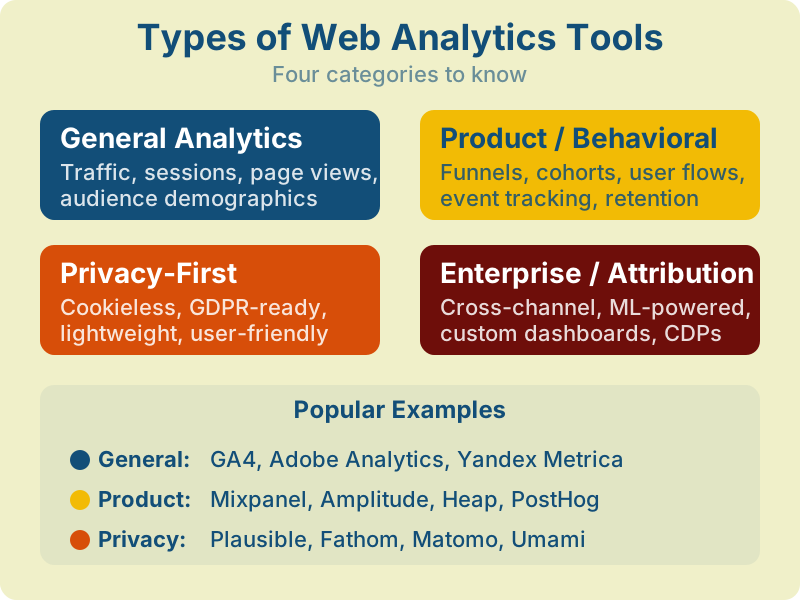
The analytics software market is broad, but most tools fall into four distinct categories. Understanding these categories helps you match the right tool to your specific use case.
General Analytics
These are the traditional web analytics tools that track website traffic, sessions, page views, and audience demographics. Google Analytics 4 is the dominant player here, but alternatives like Yandex Metrica and Adobe Analytics serve the same core function. Best for: marketing teams focused on traffic acquisition and conversion tracking.
Product / Behavioral Analytics
These digital analytics tools focus on what users do inside your product or app. They excel at funnel analysis, cohort tracking, user flows, and retention measurement. Tools like Mixpanel, Amplitude, and Heap are purpose-built for product teams. Best for: SaaS products, mobile apps, and any business where in-app behavior drives revenue.
Privacy-First Analytics
Born from the GDPR era, these tools prioritize user privacy while still providing useful insights. They typically use no cookies, collect no personal data, and offer simple dashboards. Plausible, Fathom, Matomo, and Umami lead this category. Best for: EU-focused businesses, privacy-conscious brands, and sites that want analytics without consent banners. For a deep dive into privacy-compliant options, see our guide on GDPR-compliant analytics setup.
Enterprise / Attribution Platforms
These platforms handle complex, multi-channel analytics with ML-powered attribution, customer data platforms (CDPs), and advanced segmentation. Adobe Analytics, GA360, and Salesforce Marketing Cloud serve enterprises with large-scale data needs. For more on how attribution works, read our marketing attribution guide.
Google Analytics 4: The Industry Standard
Google Analytics 4 (GA4) remains the most widely deployed web analytics tool globally, installed on millions of websites worldwide (according to BuiltWith tracking data). It replaced Universal Analytics in July 2023 with a fundamentally different architecture.
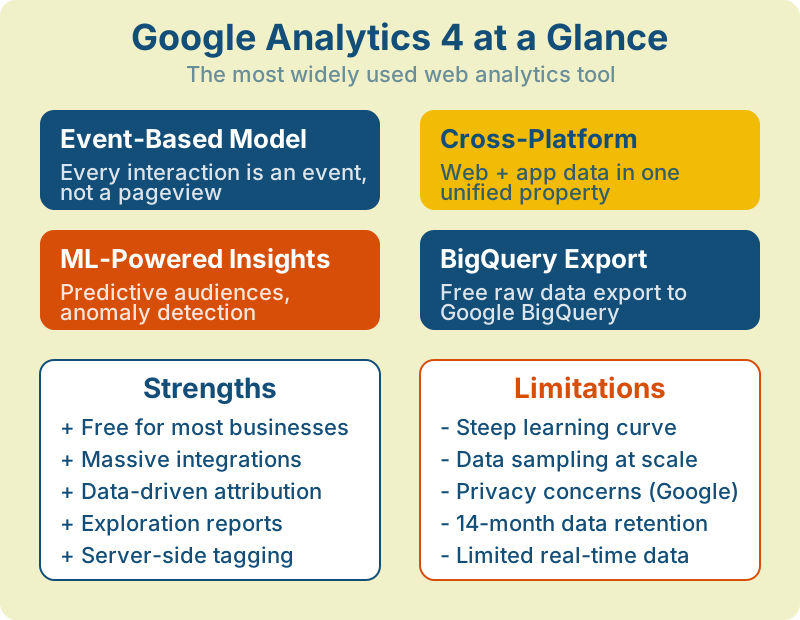
GA4’s event-based data model treats every user interaction — page views, clicks, scrolls, video plays — as an event rather than a session-based hit. This approach provides more flexibility but requires rethinking how you structure tracking compared to the old Universal Analytics model.
GA4’s free BigQuery export is a game-changer. Export your raw event data daily and build custom reports in Looker Studio or any BI tool — bypassing GA4’s interface limitations and data sampling entirely.
When GA4 Falls Short
Despite its dominance, GA4 has notable limitations. Data sampling can occur in exploration reports when queries exceed processing quotas — the threshold depends on your property size and query complexity (see Google’s sampling documentation). The standard data retention is only 14 months (though BigQuery export solves this). And for businesses operating in the EU, sending user data to Google’s US servers remains a compliance concern — which is why free online web analytics alternatives focused on privacy have gained significant market share.
Privacy-First Analytics Alternatives
The privacy-first analytics movement has grown from a niche to a mainstream category. These tools let you understand your traffic without collecting personal data or requiring cookie consent banners — a significant advantage for user experience and legal compliance.
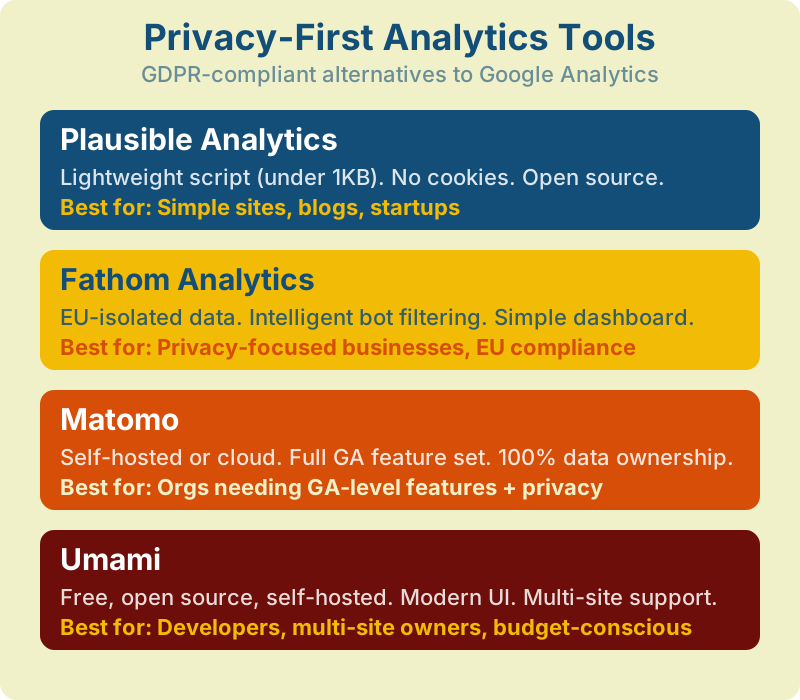
Plausible Analytics stands out for its simplicity — a single-page dashboard with under 1KB of JavaScript (compared to GA4’s ~45KB). Matomo offers the closest feature parity to GA4 with full data ownership when self-hosted — see our detailed Matomo vs GA4 comparison. Fathom focuses on enterprise-grade privacy with EU data isolation. And Umami is the top choice for developers who want a free, self-hosted solution. We compared these tools in depth in our 5 best Google Analytics alternatives guide.
| Tool | Price | Hosting | Cookies | Best For |
|---|---|---|---|---|
| Plausible | From $9/mo | Cloud | None | Simple sites, blogs |
| Fathom | From $14/mo | Cloud (EU) | None | EU businesses |
| Matomo | Free (self) / $23+/mo | Self or Cloud | Optional | GA replacement |
| Umami | Free (self) / $9+/mo | Self or Cloud | None | Developers |
| PostHog | Free tier / usage-based | Self or Cloud | Optional | Product teams |
“Privacy-first” does not always mean “GDPR-compliant.” Some tools still collect IP addresses or use fingerprinting. Always verify the tool’s specific data processing practices against your legal requirements.
Product Analytics Platforms
If you’re building a SaaS product or mobile app, general web analytics tools often fall short. Product analytics platforms like Mixpanel, Amplitude, and Heap are designed for tracking user behavior inside your product — not just on a marketing website.
Key Capabilities
- Funnel analysis — measure drop-off at each step of onboarding, checkout, or activation flows
- Cohort analysis — compare behavior across user groups segmented by signup date, plan tier, or any property
- Retention curves — visualize how many users return daily, weekly, or monthly
- User paths — see the exact sequences of actions users take before converting or churning
Mixpanel offers the deepest event analytics with flexible queries and a generous free tier (20M events/month). Amplitude excels at behavioral cohorting and is widely used by product-led growth teams. Heap auto-captures every click and interaction without manual event tagging, reducing implementation time. PostHog combines product analytics, session recordings, feature flags, and A/B testing in a single open-source platform.
| Platform | Free Tier | Specialty | Best For |
|---|---|---|---|
| Mixpanel | 20M events/mo | Event analytics, funnels | Mobile apps, SaaS |
| Amplitude | 50K MTU/mo | Behavioral cohorts, predictions | PLG teams |
| Heap | 10K sessions/mo | Auto-capture, retroactive analysis | Low-eng teams |
| PostHog | 1M events/mo | All-in-one (analytics + flags + tests) | Developers |
Free vs Paid Analytics Tools
One of the most common questions when evaluating marketing analytics tools is whether free options like GA4 are “good enough.” The answer depends on your data volume, feature needs, and privacy requirements.
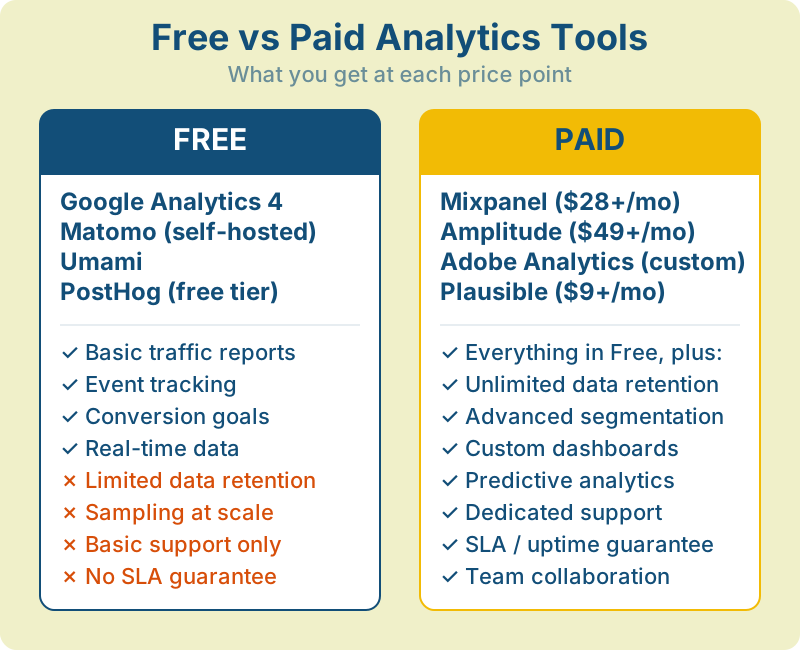
Free website analytics tools are genuinely powerful in 2026. GA4 alone provides event tracking, conversion funnels, e-commerce reports, BigQuery export, and ML-powered insights — all at zero cost. For most small and mid-sized businesses, a free tool paired with proper implementation covers 90% of analytics needs.
Paid tools earn their price when you need: unlimited data retention, no sampling, advanced segmentation, dedicated support, SLA guarantees, or specialized features like predictive modeling and AI-driven recommendations. If page speed is a concern, our Core Web Vitals guide covers the performance metrics that affect both UX and SEO.
Start with free tools. Most businesses don’t outgrow GA4 + GTM until they hit 1M+ monthly events or need features like unsampled data and custom attribution models. Don’t pay for features you won’t use.
Essential Metrics Every Tool Should Track
Regardless of which analytics software you choose, these six metric categories form the foundation of web analytics. Any serious web analytics tool should provide clear reporting on each.
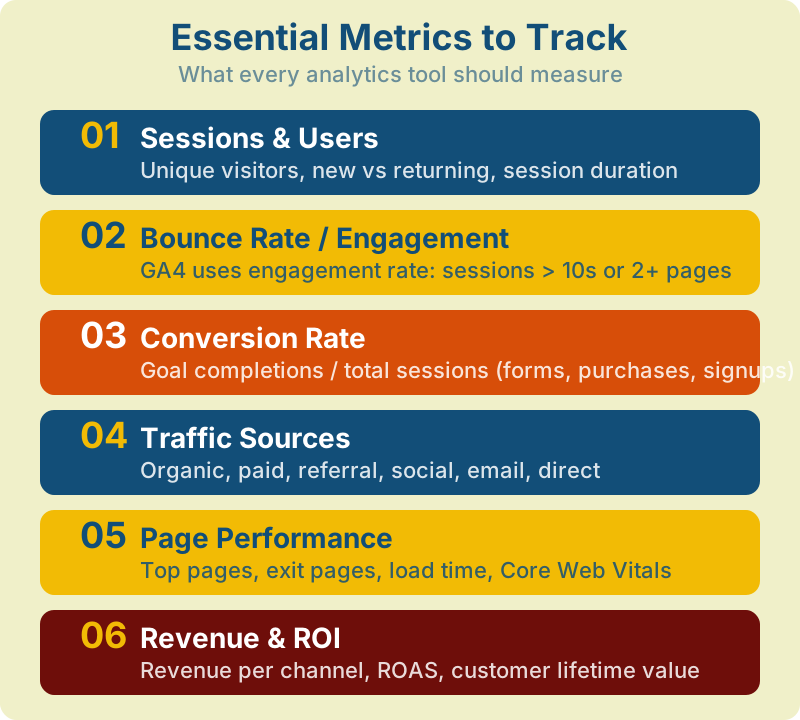
Sessions & Users
The baseline of all web analytics. Track total sessions, unique users, new vs returning visitors, and session duration. GA4 has shifted focus from sessions to “engaged sessions” — sessions lasting longer than 10 seconds, having 2+ page views, or triggering a conversion event.
Engagement & Bounce Rate
GA4 replaced traditional bounce rate with “engagement rate” — the percentage of sessions that were engaged. A session is “engaged” if it lasts more than 10 seconds, views 2+ pages, or has a conversion. This gives a much more accurate picture than the old binary bounce/no-bounce metric.
Traffic Sources
Understanding where your traffic comes from — organic search, paid ads, social media, email, referrals, direct — is critical for marketing budget allocation. Every marketing analytics tool should break down acquisition by channel, source, and medium. Proper attribution modeling helps you understand which sources truly drive conversions, not just clicks.
How Analytics Tools Collect Data
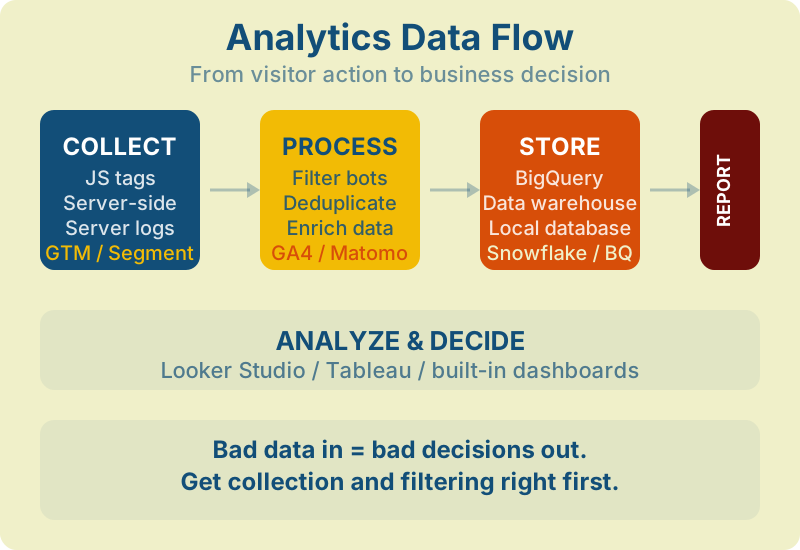
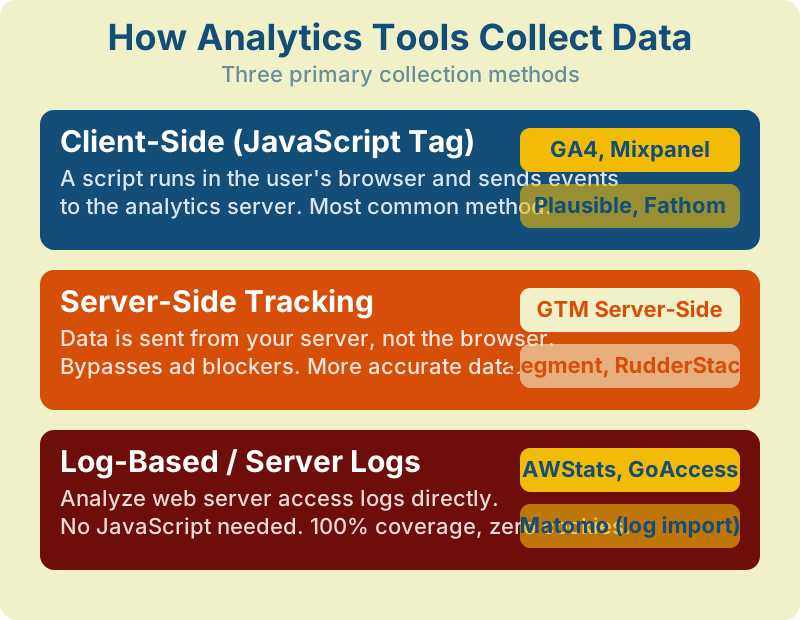
Understanding how website tracking tools collect data helps you choose the right approach for accuracy and privacy compliance. There are three primary methods.
Client-Side JavaScript
The most common method. A JavaScript snippet runs in the user’s browser and sends events to the analytics server. GA4, Mixpanel, Plausible, and most online web analytics tools use this approach. The downside: ad blockers can prevent the script from loading, which can cause significant data loss — particularly among tech-savvy audiences where ad-blocker adoption is high.
Server-Side Tracking
Data is sent from your server to the analytics platform, bypassing the browser entirely. Google Tag Manager Server-Side, Segment, and RudderStack support this method. Server-side tracking is more accurate and privacy-friendly, but requires more technical setup. A growing share of enterprises now use server-side tracking alongside client-side for improved data accuracy. Learn more about auditing your tracking setup in our website analytics audit checklist.
Log-Based Analysis
The oldest method — parsing your web server’s access logs. Tools like GoAccess and AWStats analyze nginx or Apache logs directly. No JavaScript required, zero cookies, 100% coverage of all requests. The tradeoff: no user-level interaction data, no real-time analysis, and basic reporting.
The most accurate analytics setup combines client-side and server-side tracking. Use client-side for detailed interaction data, and server-side to fill the gaps caused by ad blockers and consent rejection.
Analytics Tools Comparison Matrix
Use this table to quickly compare the most popular web analytics tools across key dimensions. This covers general analytics, product analytics, and privacy-first categories.
| Tool | Type | Best For | Privacy | Setup Difficulty | Data Export | Key Limitation | Pricing |
|---|---|---|---|---|---|---|---|
| GA4 | General | E-commerce, lead gen, content sites | Google-hosted (US/EU) | Medium | BigQuery (free) | Sampling on large queries | Free / GA360 (contract) |
| Matomo | General | GDPR-strict, GA replacement | Self-hosted / EU cloud | Medium-High | Full API, SQL access | Self-hosted needs maintenance | Free (self) / from $23/mo |
| Plausible | Privacy-first | Blogs, simple sites, startups | EU-hosted, no cookies | Easy | CSV, API | No funnels or event sequences | From $9/mo |
| Fathom | Privacy-first | EU businesses, agencies | EU-isolated, no cookies | Easy | CSV, API | Limited segmentation | From $14/mo |
| Umami | Privacy-first | Developers, multi-site | Self-hosted, no cookies | Medium | API | No built-in e-commerce reports | Free (self) / from $9/mo |
| Mixpanel | Product | Mobile apps, SaaS | Cloud (US/EU) | Medium | API, warehouse sync | Not designed for web traffic | Free tier / from $28/mo |
| Amplitude | Product | PLG SaaS, behavioral analysis | Cloud (US/EU) | Medium | API, Snowflake/BQ | Complex pricing at scale | Free tier / from $49/mo |
| PostHog | Product + All-in-one | Dev teams, product analytics | Self-hosted or cloud | Medium | Full API, SQL | UI can be overwhelming | Free tier / usage-based |
| Heap | Product | Low-eng teams, auto-capture | Cloud | Easy | API, warehouse | Auto-capture generates noise | Free tier / custom pricing |
| Adobe Analytics | Enterprise | Large orgs, multi-channel | Cloud (configurable) | High | Data Warehouse, API | Expensive, complex setup | Enterprise contract |
| Microsoft Clarity | Heatmaps / UX | UX research, behavior insight | Cloud (Microsoft) | Easy | N/A | No traffic/conversion reports | Free (unlimited) |
Don’t choose based on features alone. The best analytics software is the one your team will check daily. A simple tool used consistently beats a powerful tool ignored. Start with the smallest tool that answers your key questions.
How to Choose the Right Tool
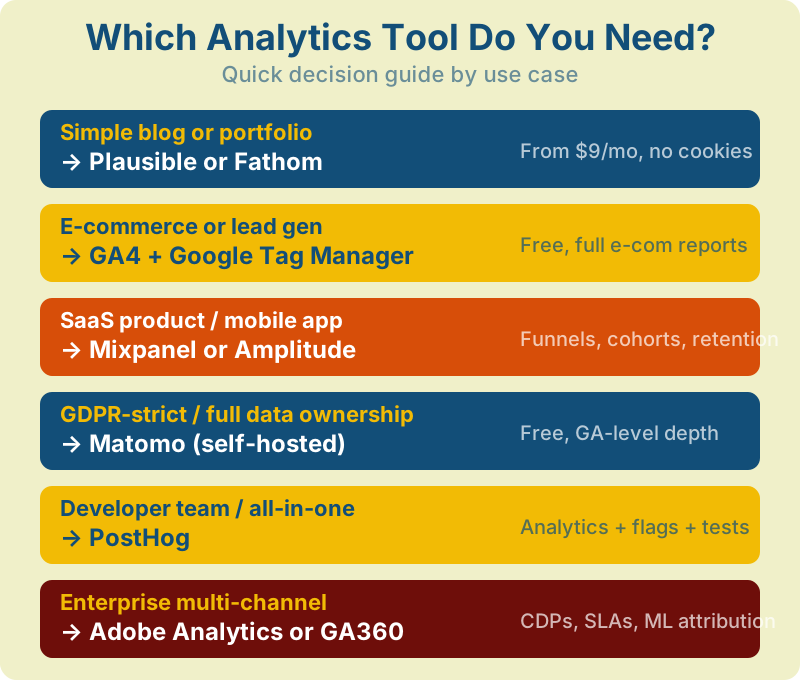
There’s no single “best” web analytics tool — only the best tool for your specific situation. Here’s how to match your needs to the right platform.
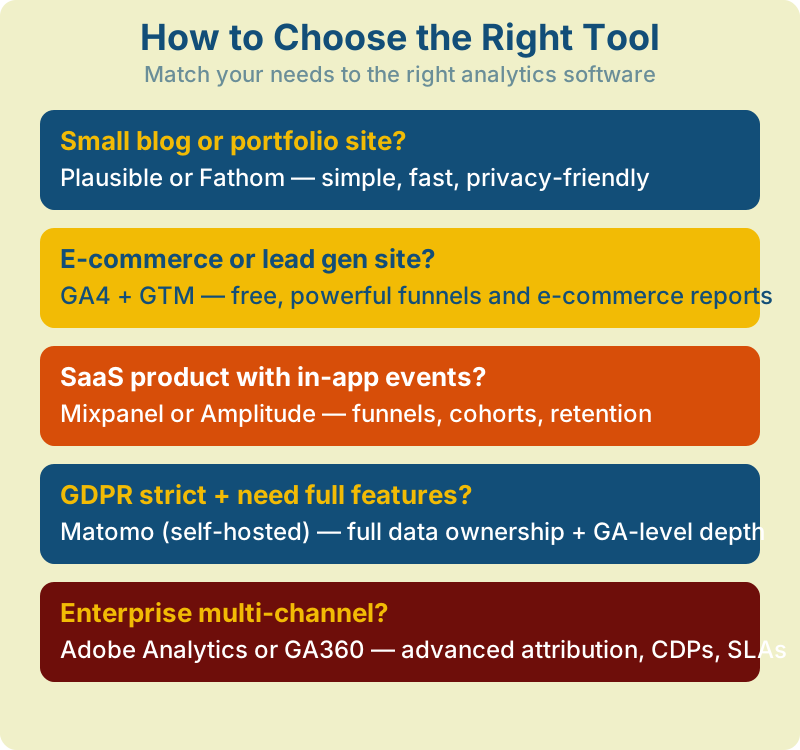
Decision Factors
- Site type — blog, e-commerce, SaaS, or content site?
- Traffic volume — under 100K, 100K-1M, or 1M+ monthly pageviews?
- Privacy requirements — GDPR strict, CCPA, or no specific compliance needs?
- Budget — free only, up to $50/mo, or enterprise budget?
- Technical resources — do you have developers to implement and maintain?
- Integration needs — what other tools must your analytics connect to?
Run two tools in parallel for 30 days before committing. Compare data between them to understand each tool’s strengths and blindspots. Most analytics platforms offer free trials — use them.
Implementation Guide
Choosing a tool is only half the battle. Poor implementation leads to inaccurate data, which leads to bad decisions. Follow these seven steps to set up any analytics software correctly.
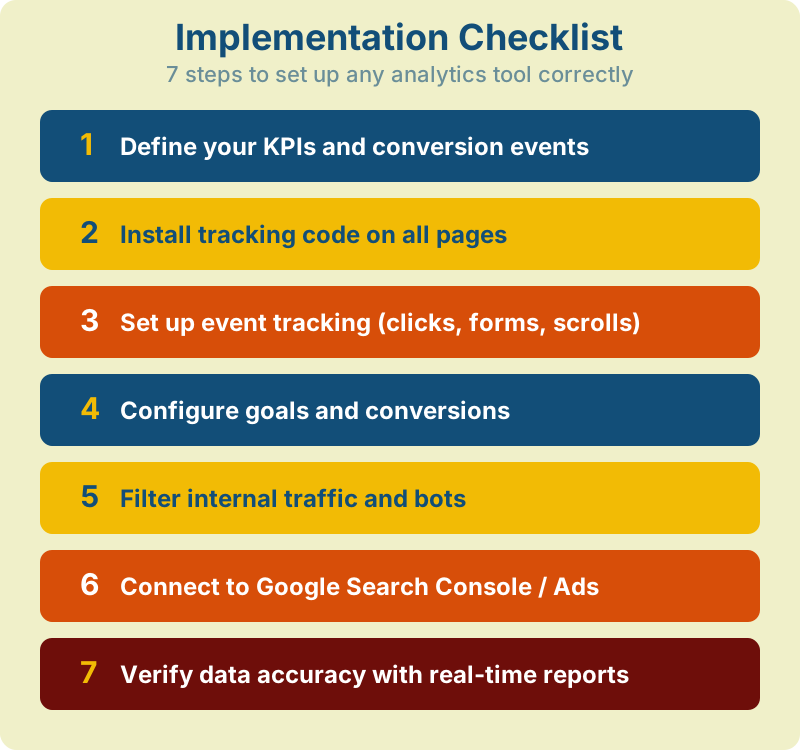
Step 1: Define KPIs Before Installing Anything
Before you add a single tracking script, answer: “What decisions will this data help us make?” Define 5-10 key performance indicators that directly tie to business goals. Every other configuration decision flows from this.
Step 2: Install Tracking Code on All Pages
Use a tag manager (GTM, Matomo Tag Manager, or Segment) rather than hardcoding scripts. This gives you flexibility to add, modify, and remove tags without touching code. Verify installation with the tool’s real-time report or browser extension (GA4 Debugger, Plausible extension).
Step 3: Set Up Event Tracking
Define custom events for meaningful interactions: form submissions, CTA clicks, video plays, scroll depth, file downloads. In GA4, use the enhanced measurement feature for automatic scroll and outbound click tracking.
Step 4: Configure UTM Parameters
Create a consistent UTM naming convention for all campaign links. Document it and share with every team member. Inconsistent UTMs (utm_source=Facebook vs facebook vs fb) fragment your data and make channels appear smaller than they are. Use lowercase, hyphens, and a shared naming template.
Step 5: Filter Internal Traffic and Bots
Exclude your team’s visits from analytics data. In GA4, create a data filter for internal traffic using IP addresses or GTM variables. In Plausible and Fathom, use the built-in exclusion feature. Also enable bot filtering — GA4 does this by default, but verify it’s active. Read more in our analytics audit checklist.
Step 6: Connect Google Search Console and Ads
Link GA4 to Search Console (for organic search data) and Google Ads (for campaign data). This gives you a unified view of paid and organic performance inside one platform. In Matomo, connect your search console data via the SEO plugin.
Step 7: Set Up Alerts and Anomaly Detection
Configure automated alerts for significant changes: traffic drops over 20%, conversion rate changes, or error page spikes. GA4 has built-in anomaly detection in the Insights panel. Plausible and Matomo support email alerts for traffic thresholds.
Step 8: Build Your First Dashboard
Create a dashboard with your 5-10 core KPIs. In GA4, use the custom reports or connect to Looker Studio. Include: sessions by source, engagement rate, top landing pages, conversion rate, and revenue (if applicable). Keep it to one screen — if you have to scroll, cut something.
Step 9: Test Everything with Real Traffic
Open your site in an incognito browser, perform key actions (page views, form submissions, clicks), and verify they appear in real-time reports. Check that UTM parameters flow through correctly. Test on both mobile and desktop. This step catches 90% of tracking errors before they corrupt your data.
Step 10: Schedule Weekly Data Reviews
Block 15 minutes weekly to review your dashboard. Write down three findings and three actions. Not ten — three. Consistency matters more than depth. Teams that review analytics weekly make better decisions than those who run monthly deep-dives but ignore data in between.
Common Analytics Mistakes
Even with the right web analytics tools, these mistakes can undermine your data quality and lead to poor decisions.
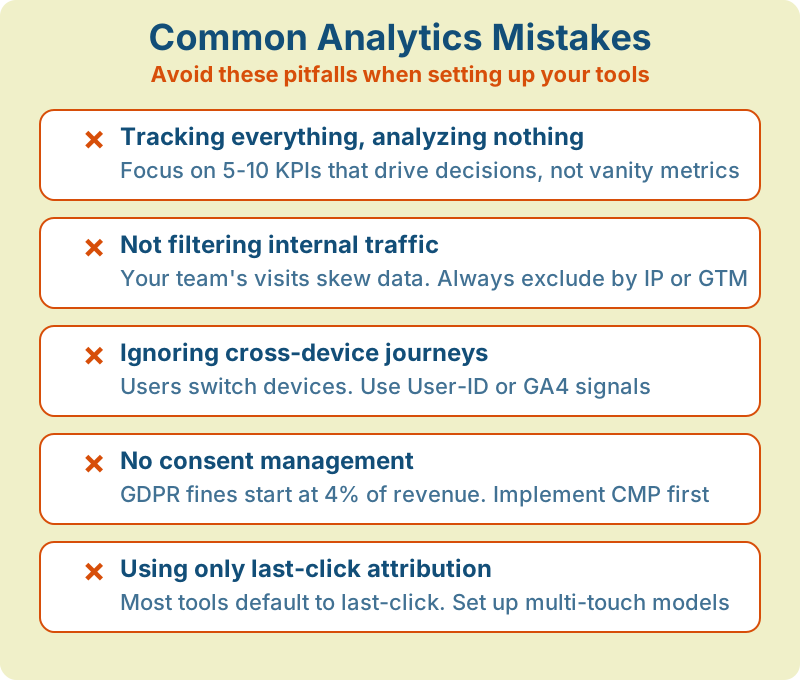
More data doesn’t mean better decisions. Teams that track 500 custom events but review none of them weekly are worse off than teams tracking 10 metrics they actually act on. Focus on your core KPIs.
GDPR fines for analytics violations reached record levels in 2024-2025. If you’re using any tool that sets cookies or collects personal data, you need a Consent Management Platform (CMP) — or switch to a cookieless tool. See our GDPR compliance guide for setup details.
Most marketing analytics tools default to last-click attribution, which ignores every touchpoint before the final click. Set up multi-touch attribution to understand the full customer journey. Our attribution guide explains every model in detail.
Users switch between phone, tablet, and desktop. If your analytics treats each device as a separate user, you’re double-counting visitors and losing conversion path data. Use GA4’s User-ID feature or Google Signals to stitch cross-device journeys together.
Don’t compare December traffic to January and conclude “traffic dropped.” Seasonality is real. Always compare year-over-year, or at minimum, control for seasonal patterns. Black Friday spikes don’t mean your strategy is working — they mean it’s November.
Analytics implementations drift over time. Developers change page structures, tag managers get cluttered, and events stop firing. Run a tracking audit quarterly: verify key events fire correctly, check for duplicate tags, and confirm conversion counting matches your source of truth. Our analytics audit checklist covers the complete process.
Running GA4, Mixpanel, Plausible, and Hotjar simultaneously creates four different “truths.” Numbers will never match exactly across platforms. Designate one tool as your source of truth for each metric category and use others for supplementary insights only.
The biggest analytics mistake isn’t choosing the wrong tool — it’s never acting on the data. Schedule a weekly 15-minute data review. One insight acted on is worth more than a perfect dashboard nobody checks.
Frequently Asked Questions
What is the best free web analytics tool?
Google Analytics 4 is the most feature-rich free website analytics tool, offering event tracking, funnels, e-commerce reports, and BigQuery export at no cost. For privacy-focused users, Umami and Matomo (self-hosted) are strong free online web analytics alternatives.
Is Google Analytics still free in 2026?
Yes. Google Analytics 4 remains free for standard use. The paid version, GA360, uses contract-based pricing (market estimates range from $50,000+/year) and adds features like unsampled data, higher data limits, and SLA guarantees.
What are the best alternatives to Google Analytics?
The top alternatives depend on your needs. Matomo offers the closest feature parity with full data ownership. Plausible and Fathom provide simple, privacy-friendly analytics. Mixpanel and Amplitude excel at product analytics. Adobe Analytics serves enterprise needs.
Do I need a paid analytics tool?
Most small and mid-sized businesses don’t need paid analytics software. GA4 covers 90% of use cases. Consider paid tools when you need unlimited data retention, zero sampling, advanced segmentation, dedicated support, or specialized product analytics features.
How do I track website visitors without cookies?
Cookieless website tracking tools like Plausible, Fathom, and Umami use techniques like session hashing instead of persistent cookies. They identify unique visitors within a session without storing any data on the user’s device — no consent banner required in most jurisdictions.
What is the difference between web analytics and product analytics?
Web analytics (GA4, Plausible) focuses on website traffic, acquisition channels, and conversion tracking. Product analytics (Mixpanel, Amplitude) focuses on in-app user behavior, feature adoption, retention, and user journeys within a product.
How many analytics tools should I use?
Most businesses need 1-2 tools for web analytics: one for web analytics (traffic + conversions) and optionally one for product analytics (if you have a SaaS/app). Adding more creates data discrepancies and maintenance overhead. Quality of implementation beats quantity of tools.
What is server-side tracking and do I need it?
Server-side tracking sends data from your server to analytics platforms instead of from the user’s browser. It bypasses ad blockers and can significantly improve data completeness. If your audience is tech-savvy or you operate in a privacy-strict region, server-side tracking is worth the investment.
Web Analytics Consultant
Web analytics consultant with 10+ years of experience helping businesses make data-driven marketing decisions. Former Senior Analytics Lead at a Fortune 500 company, now focused on privacy-first analytics solutions and helping companies move beyond Google Analytics.
View all articles →