What Is Marketing Attribution? Models, Frameworks & Cookieless Solutions

Marketing attribution is the practice of identifying which marketing channels, campaigns, and touchpoints contribute to a desired conversion. Every digital marketing attribution model attempts to answer the same fundamental question: which of my marketing efforts are actually driving results?
In a world where customers interact with brands across organic search, paid ads, social media, email, and referrals before making a decision, a marketing attribution model helps you understand the true impact of each interaction along the customer journey.
Without attribution, you allocate budgets based on gut feeling. With it, you invest in channels that genuinely drive conversions — and cut spending on those that don’t. Understanding what is an attribution model and how to apply one correctly is the difference between data-informed marketing and expensive guesswork.
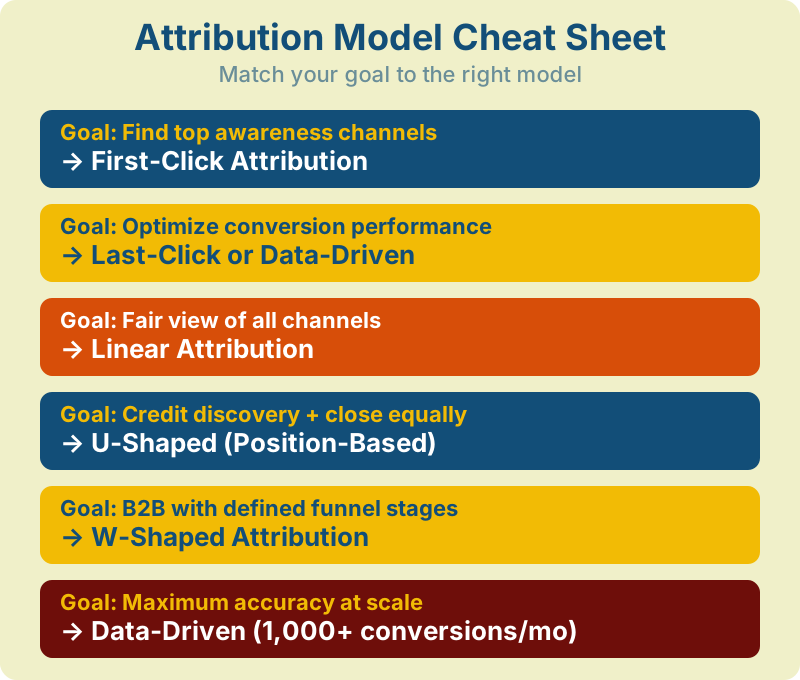
| If Your Goal Is… | Use This Model | Why |
|---|---|---|
| Find top awareness channels | First-Click | Credits the channel that introduced the customer |
| Optimize conversion performance | Last-Click or Data-Driven | Shows what closes deals; DDA adds ML accuracy |
| Get a fair view of all channels | Linear | Equal credit across every touchpoint |
| Credit discovery + close equally | U-Shaped | 40-40-20 split emphasizes intro and close |
| B2B with defined funnel stages | W-Shaped | 30-30-30-10 adds lead creation milestone |
| Maximum accuracy at scale | Data-Driven (1,000+ conv/mo) | ML learns from your actual data patterns |
Key Takeaways
- Marketing attribution assigns conversion credit to the channels and touchpoints that influenced a customer’s decision — answering “what actually works?”
- Single-touch models (first-click, last-click) are simple but misleading for multi-channel journeys. Multi-touch and data-driven models give a more accurate picture.
- Growing restrictions on third-party cookies (Safari/Firefox block by default, Chrome increasing user control) require a new measurement stack: first-party data, server-side tracking, media mix modeling, and incrementality testing.
- Your attribution window (7/30/90 days) dramatically changes which channels appear effective — match it to your actual sales cycle.
- No single model is “best.” Mature teams run multiple methods in parallel and validate with incrementality tests.
In This Guide
- Why Marketing Attribution Matters
- The Multi-Touch Customer Journey
- Types of Attribution Models
- Attribution in Practice: Credit Distribution
- Attribution Windows: 7 vs 30 vs 90 Days
- Cookieless Attribution: The New Reality
- Key Attribution Metrics
- How to Choose the Right Model
- Common Attribution Mistakes
- Implementation in 30 Minutes
- Building Your Attribution Strategy
- Tools for Marketing Attribution
- FAQ
Why Marketing Attribution Matters
Modern customers rarely convert after a single interaction. Research from Salesforce indicates that B2B buyers typically engage with 6 to 8+ touchpoints before converting — though the exact number varies significantly by industry, deal size, and sales cycle length. For e-commerce, the path is shorter but still involves multiple channels.
Every one of those interactions plays a role in digital marketing attribution, and your attribution model determines how much credit each channel receives.
Data-Driven Budget Allocation
Without attribution data, marketing teams tend to over-invest in whatever channel shows the most last-click conversions — usually branded search or direct visits. A well-configured digital attribution modeling setup reveals the full picture: the blog post that introduced your brand, the social media attribution data showing retargeting’s role in consideration, and the email that closed the deal. This lets you distribute budget to channels that generate demand, not just capture it.
Understanding the Customer Journey
Attribution mapping reveals how your customers actually behave. You might discover that 70% of conversions start with organic search, that social media works best as a mid-funnel touchpoint, or that email is your strongest closer. These insights reshape your entire marketing strategy — from content creation to channel investment. Web analytics in digital marketing becomes far more actionable when you understand the complete path, not just the last step.
Measuring True ROI
A Facebook ad that gets zero last-click conversions might still be introducing a large share of your eventual customers to your brand. Without social media attribution, you would cut that ad and watch your pipeline shrink weeks later without understanding why. Attribution connects upstream activities to downstream revenue.
The Multi-Touch Customer Journey
Before diving into models, it helps to visualize what a real customer journey looks like. The diagram below shows a typical 5-touchpoint path from initial discovery to final purchase:
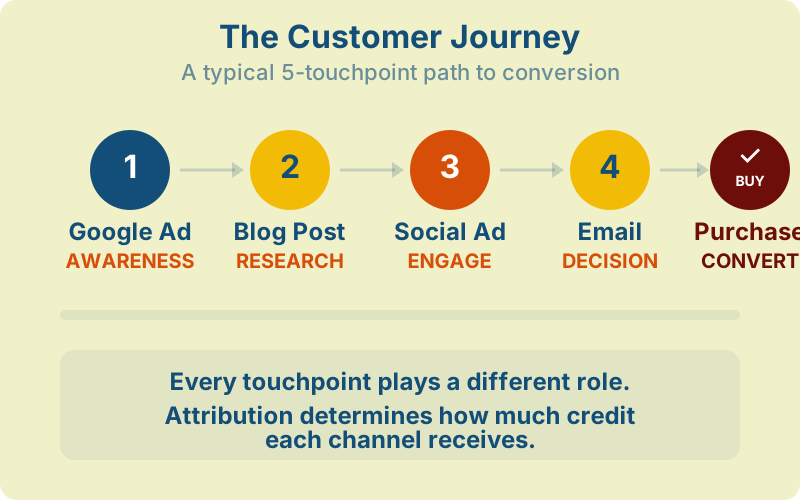
Each touchpoint serves a different function — awareness, consideration, engagement, decision, purchase. The challenge is determining how much each interaction contributed to the final conversion. That is exactly what attribution models are designed to solve.
Types of Attribution Models
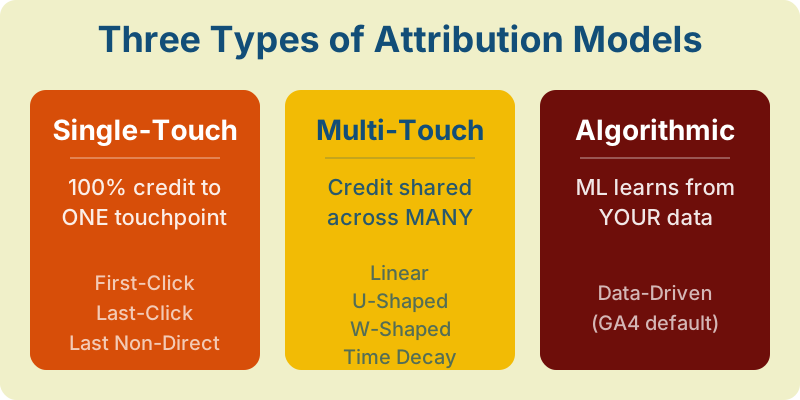
Every marketing attribution model falls into one of three categories, each with different strengths, complexity levels, and data requirements.
Single-Touch Attribution Models
Single-touch models assign 100% of conversion credit to one touchpoint. They are the simplest to implement and understand, but they ignore every other interaction in the customer journey.
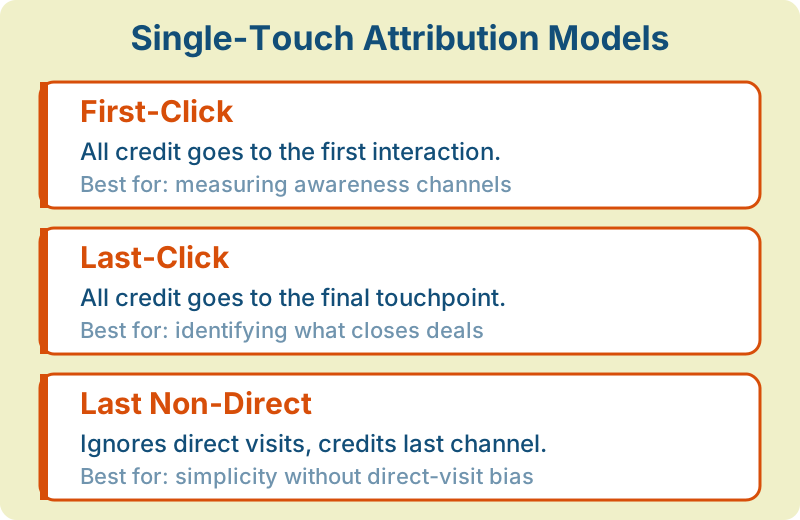
First-Click Attribution gives all credit to the very first interaction. A user clicks your Google Ad, then reads three blog posts, then converts via email — the Google Ad gets 100% of the credit. This model is useful for understanding which channels drive awareness and top-of-funnel discovery, but it completely ignores what happened after that first click.
Last-Click Attribution gives all credit to the final touchpoint before conversion. This has historically been the default model in most analytics platforms and the one most marketers are familiar with. It answers “what closed the deal?” but tells you nothing about how the customer got there. Last-click tends to overvalue branded search, direct visits, and retargeting — channels that capture demand rather than create it.
Last Non-Direct Click filters out direct visits and credits the last marketing channel the user interacted with. If someone clicks an email link, then comes back directly the next day to purchase, the email gets the credit — not the direct visit. This remains a reasonable middle ground for teams that want simplicity without the direct-visit bias.
Single-touch models can lead to seriously misallocated budgets. If you only use last-click, you risk cutting the very channels that fill your funnel — because they never appear as the “closing” touchpoint.
Multi-Touch Attribution Models
Multi-touch models distribute credit across multiple touchpoints, acknowledging that conversions are rarely the result of a single interaction. Here is where digital attribution modeling starts to reflect reality.
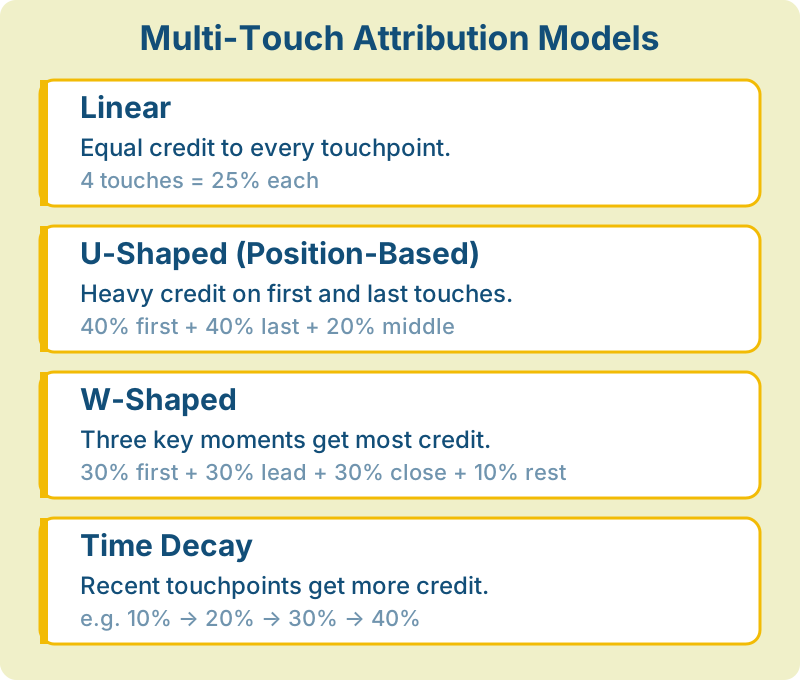
Linear Attribution splits credit equally across every touchpoint. If there were four interactions before conversion, each gets 25%. The advantage is fairness — no channel is ignored. The disadvantage is that it treats a casual social media impression the same as a high-intent product demo request.
U-Shaped (Position-Based) Attribution assigns 40% to the first touch, 40% to the last touch, and distributes the remaining 20% across everything in between. This model recognizes that the introduction and the close are typically the most important moments, while still giving some credit to nurturing touchpoints.
W-Shaped Attribution adds a third key moment: the lead creation event (typically the first form fill or sign-up). Credit is split 30% to first touch, 30% to lead creation, 30% to the conversion touch, with the remaining 10% spread across other interactions. This custom attribution model works particularly well for B2B companies with defined lead generation funnels.
Time Decay Attribution assigns more credit to touchpoints closer in time to the conversion. The first interaction might get 10%, while the final touch gets 40%. This model reflects the intuition that recent interactions are more influential than older ones, and it works well for businesses with short decision cycles where recency matters.
Algorithmic (Data-Driven) Attribution
Algorithmic attribution uses machine learning to analyze thousands of actual conversion paths and determine how much credit each touchpoint deserves based on its statistical impact on conversion probability. Rather than applying a fixed formula, this custom attribution model learns from your data.
Google Analytics 4 uses data-driven attribution as its default model. Note that Google removed several rule-based models (first-click, linear, time decay, position-based) from the GA4 interface in November 2023 — only data-driven and last-click remain as standard options. If you need other models, you can calculate them manually using BigQuery exports or third-party tools. The advantage of data-driven is accuracy — the model adapts to your specific business and customer behavior. The disadvantage is that it requires significant data volume (typically hundreds to thousands of conversions per month) to produce reliable results, and the logic is a “black box” that can be difficult to explain to stakeholders.
Attribution Models Comparison
| Model | Best For | Main Limitation | Data Needed |
|---|---|---|---|
| First-Click | Measuring awareness channels | Ignores nurture and closing | Basic tracking |
| Last-Click | Identifying what closes deals | Overvalues demand capture | Basic tracking |
| Linear | Balanced overview, quick start | Flattens differences between touchpoints | Multi-channel data |
| U-Shaped | B2C with clear discovery + close | Undervalues mid-funnel | Multi-channel data |
| W-Shaped | B2B with defined funnel stages | Requires clear stage events | CRM + analytics integration |
| Time Decay | Short sales cycles, e-commerce | Devalues awareness channels | Timestamped touchpoints |
| Data-Driven | Maximum accuracy at scale | Black box; needs high volume | 1,000+ monthly conversions |
Attribution in Practice: How Models Distribute Credit
To make this concrete, consider a customer who converts after this journey:
- Google Ad — discovers your product through a paid search ad
- Blog Post — returns via organic search to read a comparison article
- Email — clicks a nurture email with a case study
- Direct Visit — types your URL directly and purchases
Here is how each marketing attribution model distributes credit for this single conversion:
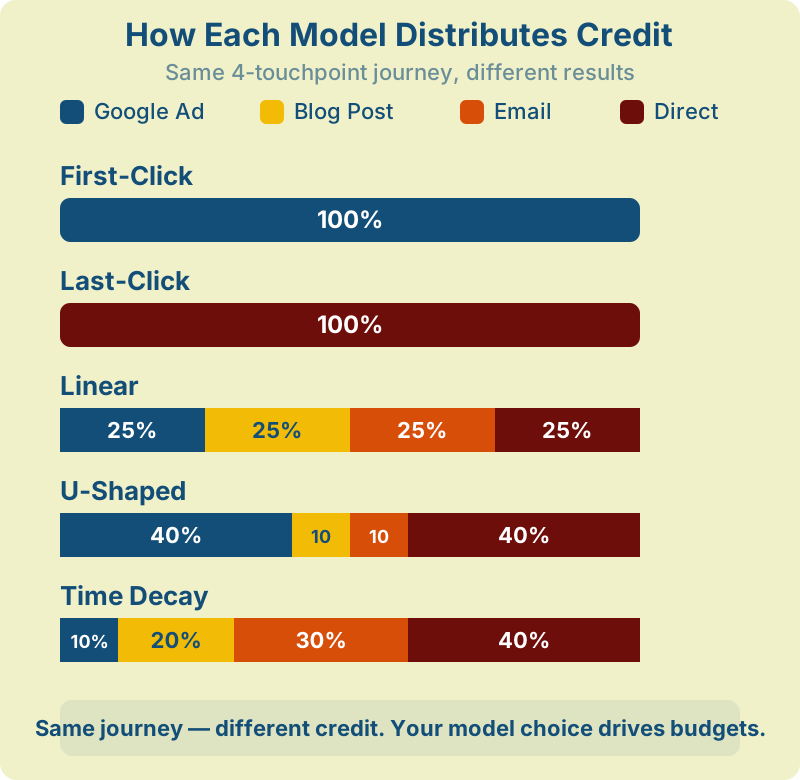
The model you choose directly impacts which channels appear to be “working.” First-click says “invest in Google Ads.” Last-click says “direct drives revenue.” Linear gives a balanced but undifferentiated view. The right answer depends on your business model and what questions you need answered.
Mini Case: Why Last-Click Kills Your Top-of-Funnel
Consider an e-commerce brand spending $20,000/month on Facebook prospecting ads and $5,000/month on Google brand search. Under last-click attribution, Google brand search shows a 12:1 ROAS while Facebook shows 0.8:1 — a money-loser.
The marketing team cuts Facebook spend by 50%. Within 4 weeks, Google brand search volume drops 35% and overall revenue falls 22%. Why? Facebook was creating demand that Google brand search was capturing. Last-click gave Google all the credit for work Facebook was doing.
When they switched to data-driven attribution and ran an incrementality test, they discovered Facebook’s true ROAS was 3.2:1 — profitable, and essential for feeding the rest of the funnel. This is the most common attribution mistake, and it’s why multi-touch models exist.
Attribution Windows: 7 vs 30 vs 90 Days
Your attribution window — the lookback period for counting touchpoints — is just as important as the model itself. The same data tells completely different stories depending on whether you look back 7 days or 90 days.
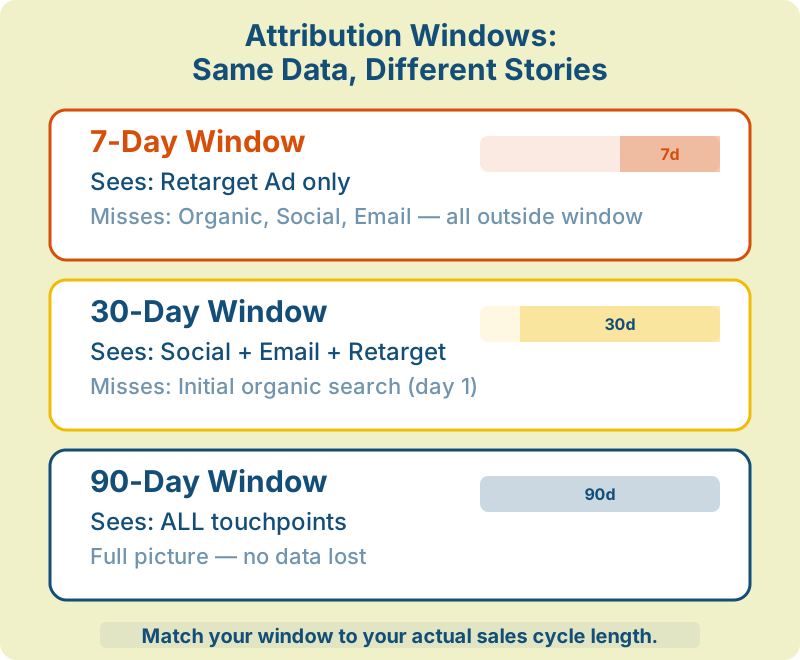
Set your attribution window based on your actual conversion data, not platform defaults. Check your analytics for the average time from first touch to conversion. B2B companies with long sales cycles should use 60–90 day windows. E-commerce brands can often use 7–30 days. If your window is shorter than your average path, you are systematically undercrediting early-funnel channels.
Cookieless Attribution: The New Reality
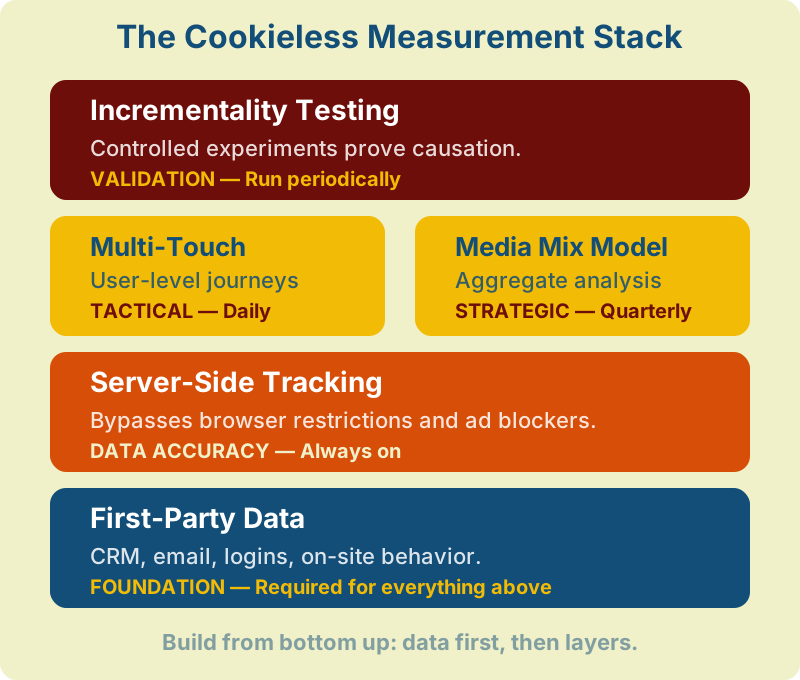
Restrictions on third-party cookies have fundamentally changed how attribution works. Safari and Firefox already block third-party cookies by default, and Chrome has shifted toward giving users more control over cookie settings. Traditional tracking relied on following users across websites with third-party cookies — that approach is increasingly limited. But attribution itself is not going anywhere. The methods are evolving into what we call the cookieless measurement stack.
First-Party Data Strategy
First-party data — information you collect directly from your users with their consent — is now the foundation of modern attribution. This includes email addresses, account logins, CRM data, and on-site behavior tracked with first-party cookies. By building a robust first-party data layer, you can track the customer journey across sessions without relying on third-party tracking.
Server-Side Tracking
Instead of relying on browser-based JavaScript tags (which are blocked by ad blockers and privacy browsers), server-side tracking sends data directly from your server to analytics and ad platforms. According to Matomo’s documentation, this approach improves data completeness by bypassing client-side restrictions, though the exact improvement varies by audience and ad-blocker adoption rates.
Media Mix Modeling (MMM)
MMM is a statistical approach that analyzes aggregate data — total ad spend, impressions, and revenue over time — to determine each channel’s contribution. It does not track individual users at all, making it inherently privacy-friendly. Google’s open-source Meridian and Meta’s Robyn framework have made MMM accessible to mid-market companies.
Incrementality Testing
Incrementality testing uses controlled experiments to measure the true causal impact of a marketing channel. By running holdout tests — showing ads to one group and not another — you can measure exactly how many conversions a channel actually caused versus how many would have happened anyway. This is the gold standard for attribution accuracy because it measures causation, not just correlation.
Cookieless Measurement Methods Comparison
| Approach | What It Measures | When You Need It | Cadence |
|---|---|---|---|
| First-Party Data | User-level journeys within your systems | Always — this is your data foundation | Always on |
| Server-Side Tracking | More complete event data, fewer gaps | High ad-blocker audiences, iOS users | Always on |
| Multi-Touch Attribution | Channel credit at the user level | Daily/weekly tactical optimization | Continuous |
| Media Mix Modeling | Aggregate channel contribution | Quarterly budget planning | Monthly/quarterly |
| Incrementality Testing | True causal impact (did this channel cause conversions?) | Validating spend on any channel | Periodic experiments |
For a deep dive into implementing these methods, read our guide on marketing attribution without cookies: what actually works in 2026.
Key Attribution Metrics
Regardless of which model you choose, these are the metrics that matter most when evaluating your digital marketing attribution model’s output.
Return on Ad Spend (ROAS)
ROAS = Revenue attributed to a channel / Cost of that channel. A ROAS of 4:1 means every dollar spent returns four dollars in revenue. Attribution models directly affect this number — the same channel can show a 2:1 ROAS under last-click and a 6:1 ROAS under first-click. Always report ROAS alongside the attribution model and window used.
Customer Acquisition Cost (CAC)
CAC = Total marketing spend / Number of new customers acquired. Attribution refines CAC by showing you channel-level acquisition costs. You might find that your overall CAC is $50, but organic search acquires customers at $12 while paid social costs $85 per customer. Understanding these unit economics is essential for scaling profitably.
Conversion Path Length
How many touchpoints does the average customer interact with before converting? If your path length is 7+, single-touch attribution is definitely misleading you. Shorter paths (1–2 touches) can get by with simpler models. This metric also informs your attribution window — longer paths need longer lookback periods.
Assisted Conversions
Assisted conversions count how often a channel appears in the conversion path without being the last click. A channel with high assisted conversions but low last-click conversions is an important part of your funnel that last-click attribution would undervalue. Google Analytics 4 reports this natively under the “Conversion paths” report. Social media attribution often reveals high assist rates paired with low direct conversions — which is why social frequently gets cut by teams using only last-click.
How to Choose the Right Attribution Model
There is no universally “best” model. What is an attribution model’s value if it doesn’t match your business reality? Use this decision framework:
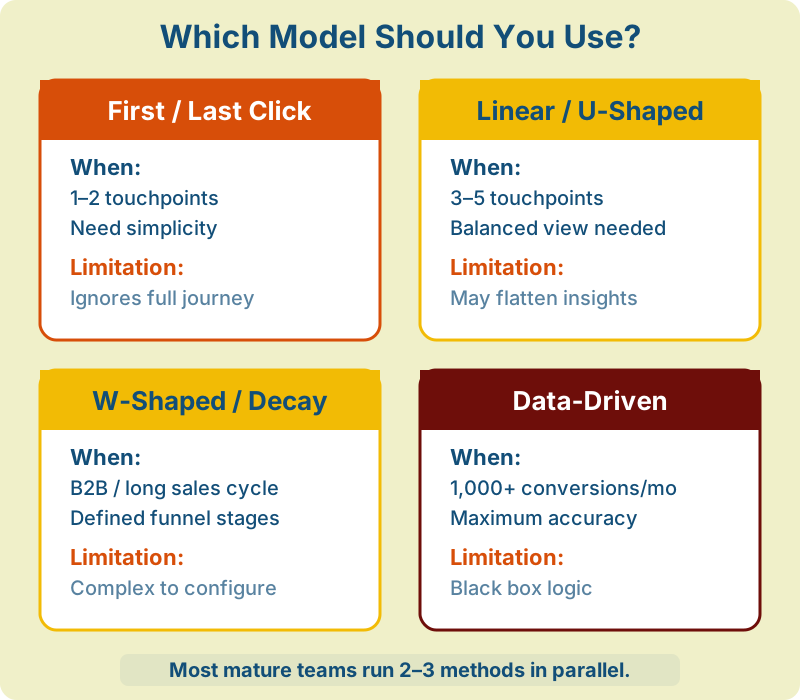
Choose First-Click or Last-Click if:
- You need simplicity and fast implementation
- Your customer journey is short (1–2 touchpoints)
- You want to answer one specific question: “what drives awareness?” (first-click) or “what closes deals?” (last-click)
Choose Linear or U-Shaped if:
- Your customer journey involves 3–5 touchpoints
- You want a balanced view of channel performance
- You don’t have enough data volume for algorithmic models
Choose W-Shaped or Time Decay if:
- You have a defined lead generation funnel with clear stages
- Your sales cycle is long (B2B, high-value purchases)
- You need to optimize both demand generation and demand capture
Choose Data-Driven / Algorithmic if:
- You have 1,000+ monthly conversions
- You use a platform that supports it (GA4, Amplitude, HubSpot)
- You want maximum accuracy and can accept reduced transparency
Many mature organizations use multiple models simultaneously — for example, data-driven for daily optimization, MMM for quarterly budget planning, and incrementality tests for validation.
Common Attribution Mistakes
Even teams that invest in attribution make critical errors. Avoid these pitfalls.
No single marketing attribution model tells the complete story. Last-click shows what closes deals but hides everything that built demand. First-click reveals discovery channels but ignores nurturing. Run multiple models in parallel and compare. When three models agree a channel underperforms, you can confidently cut it. When they disagree, you have found something worth investigating.
If you use a 7-day window but your average sales cycle is 45 days, you are systematically undervaluing every channel that touches customers early. B2B companies should test 60–90 day windows. E-commerce brands can often use 7–30 days. Set your window based on actual conversion path data, not platform defaults.
Just because a touchpoint appears in conversion paths does not mean it caused the conversion. Display ads frequently appear in paths simply because they reach enormous audiences — many of whom would have converted anyway. This is why incrementality testing is critical: it measures causation, not just correlation.
Many digital attribution modeling setups only track digital channels, missing phone calls, in-store visits, trade shows, word-of-mouth, and podcast mentions. If a significant portion of customers discover you offline, your digital attribution is overcrediting online channels. Combine digital tracking with survey-based attribution (“how did you hear about us?”) for a more complete picture.
Attribution models optimize for the conversion event you define. But not all conversions are equal. A customer acquired via a 70% discount code may have one-fifth the lifetime value of one who found you through an educational blog post. Connect attribution data to downstream revenue and customer lifetime value whenever possible.
Implementation in 30 Minutes
You don’t need a data team to start with attribution. Here’s a practical checklist to get basic multi-touch attribution running in under 30 minutes using tools you likely already have.
UTM Naming Convention (5 minutes)
Create a simple naming template and share it with every team member who creates campaign links:
- utm_source: platform name (google, facebook, linkedin, newsletter)
- utm_medium: channel type (cpc, email, social, referral)
- utm_campaign: campaign name (spring-sale-2026, webinar-attribution)
- utm_content: ad variation or CTA (banner-blue, cta-header)
Rule: always lowercase, always hyphens, never spaces. Inconsistent UTMs are the #1 cause of fragmented attribution data.
Define Your Conversion Events (5 minutes)
Open GA4 and mark 3-5 key events as conversions: purchase, lead_form_submit, demo_request, signup, or whatever matters most. Don’t mark everything as a conversion — if everything is important, nothing is.
Check Your Attribution Settings (5 minutes)
In GA4, go to Admin → Attribution Settings. Verify:
- Reporting attribution model is set to Data-Driven (default)
- Lookback window matches your sales cycle (30 days for e-commerce, 90 days for B2B)
- If you have a CRM (HubSpot, Salesforce), check that it’s connected to GA4 or receiving UTM data from your forms
Review Your First Attribution Report (10 minutes)
Go to GA4 → Advertising → Attribution paths. Look for:
- Which channels appear most as first touchpoints (your awareness drivers)
- Which channels appear most as last touchpoints (your closers)
- Which channels have high assisted conversions but low last-click (undervalued channels)
Set Up a Comparison View (5 minutes)
In GA4 → Advertising → Model comparison, compare data-driven vs last-click side by side. Channels where data-driven gives more credit than last-click are your hidden demand generators — the channels building your pipeline that last-click would tell you to cut.
Save this comparison as a recurring check. Review it every two weeks. Over time, you’ll develop intuition about how your channels work together — which is far more valuable than any single attribution report.
Building Your Attribution Strategy: Step by Step
If you are starting from scratch or rethinking your current setup, follow this sequence:
Step 1: Define your conversion events. What actions matter most? Purchases, sign-ups, demo requests, lead form submissions? Be specific — “conversion” means different things to different teams. If you need help auditing your current tracking, see our complete analytics audit checklist.
Step 2: Map your channels and touchpoints. List every marketing channel you use: organic search, paid search, social media, email, direct, referral, affiliates, offline events. For each, identify the specific touchpoints you can track.
Step 3: Implement tracking correctly. Use consistent UTM parameters across all campaigns. Set up server-side tracking where possible. Ensure your analytics platform receives clean, deduplicated data. Bad data in means bad attribution out.
Create a UTM naming convention document and share it with every team that creates campaign links. Inconsistent UTM parameters (utm_source=Facebook vs facebook vs fb) will fragment your attribution data and make channels appear smaller than they are.
Step 4: Start with last-click, then expand. Last-click attribution is the baseline every digital marketing attribution model builds on. Once you have reliable last-click data, add a multi-touch model (linear or U-shaped) and compare the results. The differences reveal which channels are over- or under-valued.
Step 5: Add incrementality testing. Run holdout tests on your highest-spend channels. If pausing a channel for two weeks has no measurable impact on conversions, your attribution model was giving it false credit.
Step 6: Report with context. Always present attribution data alongside the model used, the attribution window, and known limitations. A ROAS number without context is meaningless — or worse, misleading.
Attribution is not a one-time project — like web performance optimization, it is an ongoing practice that evolves as your marketing mix changes, privacy regulations tighten, and new measurement methodologies emerge. The teams that treat attribution as a living system — constantly testing, validating, and refining — consistently make better marketing decisions.
Tools for Marketing Attribution
The digital attribution modeling tool landscape ranges from free built-in features to enterprise platforms:
Google Analytics 4 — Free. Uses data-driven attribution by default. Good for most businesses, but limited to Google’s ecosystem for full cross-channel tracking. Requires careful setup of events and conversions for accurate multi-touch data. See GA4’s attribution documentation.
Amplitude — Product analytics platform with built-in multi-touch attribution, funnel analysis, and cohort tracking. Strong for product-led growth companies that need to connect marketing touchpoints to in-product behavior.
HubSpot — CRM with built-in multi-touch attribution reporting. Particularly strong for B2B companies already using HubSpot for marketing automation and sales. Supports multiple attribution models out of the box.
Triple Whale — Built specifically for e-commerce (Shopify). Combines first-party tracking with server-side attribution for accurate ROAS measurement in a post-cookie world.
Matomo — Open-source, self-hosted web analytics in digital marketing with multi-channel attribution. Full data ownership and GDPR compliance by design. A strong choice for privacy-conscious teams that want to run their own marketing attribution model without sending data to third parties.
Northbeam — AI-powered attribution platform focused on DTC brands. Uses first-party data and statistical modeling for cross-channel attribution without cookies.
| Tool | Type | Best For | Key Feature | Pricing |
|---|---|---|---|---|
| GA4 | General analytics | Most businesses (free) | Data-driven attribution by default | Free / GA360 (contract) |
| HubSpot | CRM + attribution | B2B using HubSpot stack | Multi-touch reports tied to CRM deals | From $800/mo (Marketing Hub) |
| Amplitude | Product analytics | PLG SaaS companies | Marketing → in-product journey linking | Free tier / from $49/mo |
| Triple Whale | E-commerce attribution | Shopify / DTC brands | First-party pixel + server-side ROAS | From $100/mo |
| Northbeam | AI attribution | DTC brands at scale | Cookieless ML cross-channel attribution | Custom pricing |
| Matomo | Self-hosted analytics | Privacy-first organizations | Multi-channel attribution + GDPR compliance | Free (self) / from $23/mo |
| Google Meridian | Media Mix Model | Quarterly budget planning | Open-source MMM for aggregate analysis | Free (open source) |
| Meta Robyn | Media Mix Model | Multi-channel budget allocation | Open-source MMM with budget optimizer | Free (open source) |
The best attribution tool is the one your team will actually use. Start with what you have (most likely GA4), implement multi-touch attribution correctly, and upgrade when your data volume and business complexity demand it. For a comparison of privacy-focused analytics platforms, see our guide to Google Analytics alternatives. For a broader view of web analytics tools across all categories, see our complete web analytics tools guide.
Frequently Asked Questions
What is an attribution model in marketing?
A marketing attribution model is a framework that determines how conversion credit is assigned to different marketing touchpoints in a customer’s journey. It helps marketers understand which channels, campaigns, and interactions contributed to a sale, sign-up, or other conversion event. Models range from simple (first-click, last-click) to complex (data-driven, algorithmic).
What is the difference between single-touch and multi-touch attribution?
Single-touch attribution gives 100% of the credit to one touchpoint — either the first interaction (first-click) or the last one (last-click). Multi-touch attribution distributes credit across multiple touchpoints, recognizing that most conversions involve several interactions. Multi-touch is more accurate for businesses with longer customer journeys.
Is Google Analytics 4 attribution reliable?
GA4’s data-driven attribution model is reliable when you have sufficient conversion volume (ideally 300+ conversions per month for stable results). It adapts to your specific data and is more accurate than static models. However, GA4 is limited to tracking within Google’s ecosystem and cannot fully track cross-device or offline journeys without additional setup.
What replaces third-party cookies for attribution?
The cookieless measurement stack includes: first-party data collection (CRM, email, logins), server-side tracking (server-to-server data transfer), media mix modeling (aggregate statistical analysis), and incrementality testing (controlled experiments). Most mature teams use a combination of these approaches rather than relying on any single method.
How does social media attribution work?
Social media attribution tracks how social channels (organic and paid) contribute to conversions. It is challenging because social interactions (impressions, video views, engagement) often influence decisions without a direct click. Multi-touch or data-driven models capture social’s role better than last-click, which typically undercredits social channels. Platform-specific tools (Meta Attribution, LinkedIn) and third-party solutions help fill tracking gaps.
What is a custom attribution model?
A custom attribution model is a tailored framework where you define exactly how credit is distributed across touchpoints based on your specific business logic. For example, you might assign 50% to the first touch, 30% to the lead creation event, and 20% to everything else. Google Analytics (Universal Analytics) supported custom models natively; in GA4, custom models require BigQuery exports and manual configuration.
How many conversions do I need for data-driven attribution?
Most platforms recommend a minimum of 300–600 conversions per month for data-driven attribution to produce stable, reliable results. Google’s GA4 model can work with fewer conversions but may fall back to a rules-based model when data is insufficient. If you have fewer than 300 monthly conversions, start with linear or U-shaped attribution instead.
Should I use the same attribution model for all channels?
Not necessarily. You can use different models for different purposes: data-driven attribution for daily campaign optimization, media mix modeling for quarterly budget planning, and incrementality testing for validating high-spend channels. The goal is not to find one “correct” answer but to triangulate across methods for more confident decisions.
Web Analytics Consultant
Web analytics consultant with 10+ years of experience helping businesses make data-driven marketing decisions. Former Senior Analytics Lead at a Fortune 500 company, now focused on privacy-first analytics solutions and helping companies move beyond Google Analytics.
View all articles →